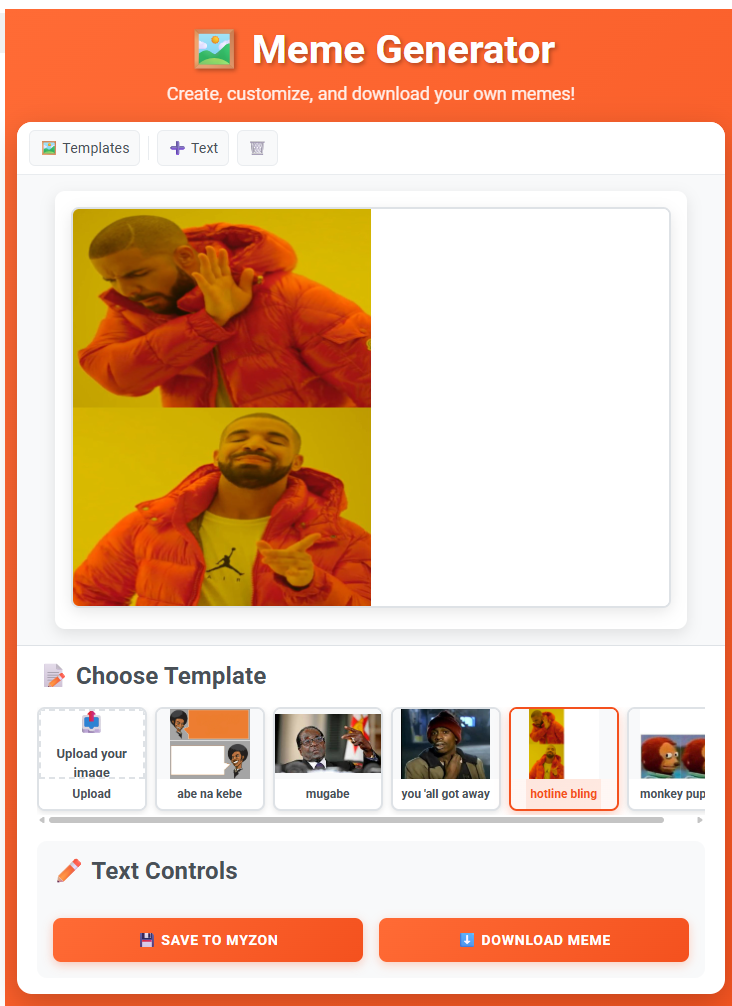
Have a funny idea but cannot find the perfect meme for it? With Memezon’s free meme generator, you can turn a popular template—or your own image—into a custom meme in just a few minutes.
This simple guide walks you through the process from choosing an image to downloading the finished meme.
Ready to begin? Open the Memezon Meme Generator.
Step 1: Choose a Meme Template
Open the generator and look through the available options under Templates. Choose an image that fits the reaction, joke, or story you want to share.
A good template should make the idea easy to understand even before someone reads the text.
Want to use your own picture?
Select Upload your image, then choose a photo from your device. This is perfect for turning a funny moment with friends, family, coworkers, or pets into an original meme.
Only upload images you own or have permission to use.
Step 2: Add Your Meme Text
Go to Add Text and enter your caption in the Text Content field.
Keep the wording short and easy to read. Many effective memes use one line to set up the situation and another line to deliver the punchline.
For example:
- Setup: “Me opening my laptop on Monday”
- Punchline: “The laptop also needs a weekend”
Check the preview as you write and fix any spelling mistakes before moving on.
Step 3: Pick the Right Font
Use Font Family to choose the style of your caption. Memezon includes familiar options such as:
- Impact
- Arial Black
- Comic Sans MS
- Times New Roman
- Helvetica
- Georgia
Impact or Arial Black works well for the classic bold meme look. A different font can help when you want the meme to feel playful, dramatic, formal, or deliberately awkward.
Step 4: Make the Caption Easy to Read
Use the available text controls to make sure your caption stands out from the image:
- Increase or decrease the Font Size
- Choose a contrasting Text Color
- Add an Outline Color
- Adjust the Outline Width
- Set the Font Weight to Normal, Bold, Bolder, or Lighter
- Align the text to the Left, Center, or Right
White text with a dark outline is a reliable choice for busy photographs. If the image is very bright, darker text with a light outline may work better.
Step 5: Review Your Meme
Pause and look at the complete meme before saving it. Ask yourself:
- Can the caption be read quickly on a phone?
- Does the image match the joke?
- Is the punchline clear?
- Is any important part of the picture hidden?
- Are names and difficult words spelled correctly?
If the joke needs a long explanation, try shortening the caption or choosing a more recognizable image.
Step 6: Save or Download Your Meme
When you are happy with the result, choose one of the two finishing options:
- Download Meme saves the finished image so you can share it wherever you like.
- Save to MyZon adds it to your Memezon account. Sign in if the site asks you to do so.
Before posting, remember that private photos, personal information, hateful content, or copyrighted material can create problems. Funny works best when it does not put someone at risk.
Quick Tips for Better Memes
- Start with one clear idea. Do not force several jokes into one image.
- Use fewer words. A meme should be understood in seconds.
- Create contrast. Make the text noticeably different from the background.
- Match the template to the emotion. The face or scene should support the caption.
- Preview before downloading. Small corrections can make a big difference.
- Make it relatable. Everyday experiences often produce the most shareable memes.
Your Meme Is Ready
You do not need professional design software to turn an idea into a meme. Choose a template or upload your own image, write a clear caption, customize the text, and download the result.
Create your first meme on Memezon and share your creativity with the world.
Comments (0)
No comments yet. Be the first to comment!